
Last updated November 17, 2026
Avid Media Composer and DaVinci Resolve are industry-leading non-linear editors (NLEs). Avid remains the standard for large-scale collaborative film and television projects due to its robust media management. DaVinci Resolve, developed by Blackmagic Design, is the premier choice for color grading and integrated visual effects via its Fusion page.
| Feature | Avid Media Composer | DaVinci Resolve Studio |
|---|---|---|
| Primary Use | High-end film & broadcast | Color grading & integrated VFX |
| Hardware Focus | CPU & Certified I/O | GPU Intensive |
| VFX Engine | Third-party plugin reliance | Integrated Fusion (Node-based) |
| Collaboration | Bin sharing (Nexis) | Cloud & Multi-user database |
| Audio Toolset | Standard editing tools | Integrated Fairlight DAW |
| Media Logic | Database-driven (Rigid) | File-pointing (Flexible) |
Key takeaways
- Industry Dominance. Avid Media Composer is the dominant choice for long-form Hollywood and broadcast television editing.
- Integrated Suite. DaVinci Resolve offers an all-in-one suite including Fairlight audio and Fusion VFX.
- Interoperability. Professional round-tripping between both platforms is possible using AAF or XML files.
- Technical Requirements. Resolve requires higher GPU performance, while Avid demands more meticulous media engineering upfront.
- Remote Review. Pretzel Logic facilitates remote collaborative reviews for national brands regardless of the chosen NLE.
Understanding the Evolution of Professional NLE Software
Modern post-production has shifted from single-tool workflows to integrated ecosystems that prioritize story over software. In the early days of digital editing, tools were often siloed. You edited in one program, mixed audio in another, and sent the project to a specialized suite for color. Today, the choice between Avid Media Composer and DaVinci Resolve represents two different philosophies of how a story should be assembled.
Professional Rule: Never choose an NLE mid-stream; your post-production stack should be determined during the pre-production planning phase to ensure technical compatibility.
Avid Media Composer remains the standard for performance and workflow integration in high-end industry environments according to a Filmora Competitive Analysis. For decades, it has been the backbone of the "cutting room," providing a stable environment where technical failures are rare. Meanwhile, Blackmagic Design transformed DaVinci Resolve from a specialized color grading tool into a comprehensive post-production powerhouse. This shift allowed creators to handle almost every aspect of a project, from the first cut to the final master, within a single application.
Choosing between these giants depends on whether the priority is technical media stability or creative, multi-disciplinary flexibility. At Pretzel Logic, we view these tools as instruments for visionary storytelling rather than just software packages. We might utilize the rigid logic of Avid for a complex broadcast campaign or the fluid color tools of Resolve for a cinematic brand film. Our focus is always on how the software supports the creative "twist" that makes content stand out.
Avid Media Composer for High-End Post-Production
Avid is built for organization. It handles thousands of hours of footage without compromising system stability. It is common for a feature film or a long-running documentary series to have hundreds of "bins" containing thousands of clips. Avid’s database-driven architecture ensures that even with a massive amount of data, the software doesn’t lag or crash. This is why our team often highlights Avid Media Composer for High-End Post-Production when discussing long-form projects.
The software’s bin-sharing capabilities allow multiple editors to work on the same project simultaneously. This is a must for feature films and large-scale commercial campaigns. In a typical Avid environment, one editor cuts the main sequence while an assistant editor organizes new dailies and a sound editor polishes the dialogue. Everyone accesses the same media. This collaborative infrastructure keeps the software as the standard in Hollywood and major broadcast networks.
- Media Management. It utilizes a logical, database-driven system that tracks every frame across complex shared storage networks.
- Precision Trimming. The learning curve is steep. However, its precision in trimming and keyboard-centric interface is unmatched for speed in long-form narratives.
- Stability. This software handles high-resolution media by managing its link to or conversion into formats that keep the system responsive.
- Broadcast Standards. Choose this path for broadcast commercials where rigid delivery standards and multi-editor collaboration are non-negotiable.
DaVinci Resolve Video Editing and Creative Flexibility
DaVinci Resolve offers an all-in-one post-production environment. It combines professional editing, color correction, visual effects, and audio post-production in a single software tool. This eliminates the need to export or transcode between different applications. Users simply switch between "pages" dedicated to specific tasks. For many modern creators, this DaVinci Resolve video editing workflow is a significant time-saver.
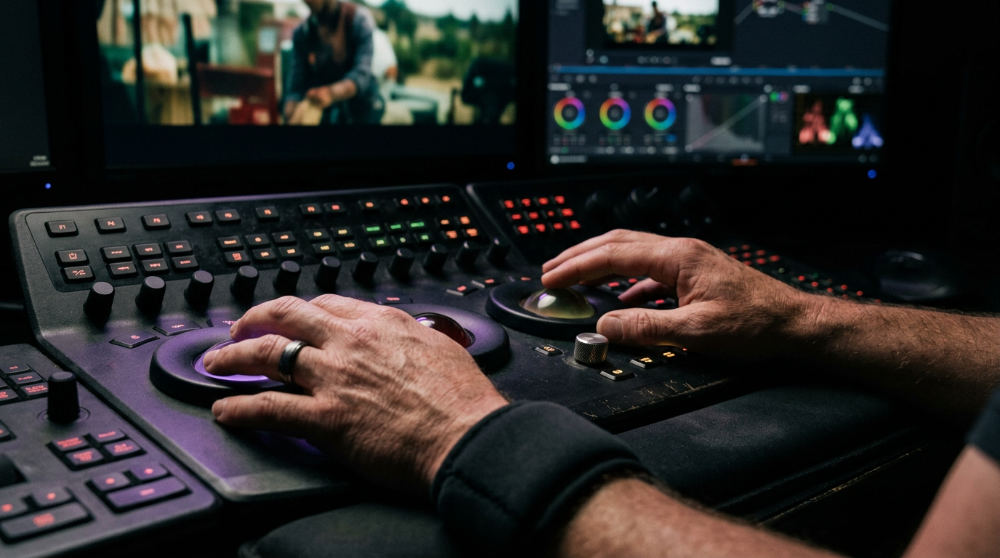
The Fusion page provides professional node-based visual effects. This reduces the need to export files to third-party software for compositing or motion graphics. Unlike layer-based systems, nodes allow for complex visual hierarchies. These are easier to manage as a shot becomes more sophisticated. Its color grading suite is the industry benchmark, utilized by virtually every major digital grading company for high-end commercial looks.
- Fairlight Audio. Resolve’s Fairlight page offers a suite of digital audio tools, allowing for cinematic sound design within the post-production workflow.
- Node-Based Color. The power of Resolve lies in its nodes. These allow for surgical precision when balancing skin tones or creating stylized "looks."
- Integrated AI. For brands seeking rapid prototyping, Resolve’s internal tools allow us to integrate AI video production elements quickly during the edit, such as automatic object removal or voice isolation.
- Version Speed. Every tool is in one box. Making a change to a visual effect and immediately seeing how it looks with the final color grade is instantaneous.
Do you work with brands across the country?
Yes, we facilitate remote collaborative reviews regardless of the NLE used, serving brands from San Diego to the East Coast. Our software for post production bridges the gap between our local production hub and remote stakeholders through cloud-based review platforms.
Workflow Tip: For national brand collaboration, ensure your media is transcoded to a proxy format that allows for remote review sessions across different time zones without friction.
Modern production clinics that offer this service often rely on high-bandwidth infrastructure. They use it to manage 4K and 8K assets for remote stakeholder collaboration. By hosting project databases in the cloud, our editors can collaborate with stakeholders regardless of location. This global reach maintains a visionary workflow that isn’t limited by geography or software choice. The goal remains constant communication and creative alignment, whether the project lives in an Avid Nexis environment or a Resolve collaborative database.
Technical Considerations and Hardware Requirements
Choosing between Avid and Resolve requires a focus on GPU-accelerated processing for Resolve or CPU-driven stability for Avid. Resolve is highly dependent on GPU power. It scales performance based on the number and quality of graphics cards installed. If you are building a workstation for DaVinci Resolve, the graphics card is your most important investment. Avid Media Composer is optimized to run on a wider range of hardware but requires a very specific, certified configuration to ensure legendary stability.
- GPU vs CPU. Resolve scales almost linearly with the number of GPUs you have, whereas Avid is more concerned with processor clock speed and RAM for handling its database.
- Storage Speed. Both systems require fast SSD or RAID arrays to play back high-bitrate footage, but Avid’s DNx codecs are generally "lighter" on the system than Resolve’s reliance on raw processing.
- External Hardware. Professionals often use dedicated I/O boxes to send a clean signal to a calibrated reference monitor. This setup is standard in both Avid and Resolve suites.
- Motion Graphics. Motion graphics management is often smoother in Resolve due to Fusion, though Avid handles external alpha-channel assets with high reliability.
Successful post-production requires a logical pre-production plan. This dictates whether you need the sheer power of Resolve’s nodes or Avid’s stability. For businesses looking to scale their digital presence, tools like Pollaroo can help bridge the gap between high-end video production and measurable marketing results.
Limitations and When to Choose an Alternative
Avid can feel restrictive for solo creators. It is not built for the "drag-and-drop" style of editing found in simpler apps. Its "Media Tool" and file management system require moving media into specific folders (Avid MediaFiles). This can be frustrating for those used to the more flexible file-pointing systems of Resolve or Premiere Pro. If you don’t have the time to learn the "Avid way" of handling media, the technical barrier becomes a significant bottleneck.
DaVinci Resolve free limitations include restrictions on maximum export resolutions and the exclusion of several advanced features. While the free version is incredibly powerful, commercial teams will find that collaborative multi-user databases are absent. This can stall team-based projects. Certain advanced features like specialized noise reduction and stereoscopic 3D tools are locked behind the Studio version.
- Learning Curve. Avid is notoriously difficult to learn on your own. It is software built for "power users" who rely on keyboard shortcuts.
- Hardware Bottlenecks. Resolve can be unusable on older laptops. It needs a dedicated, powerful graphics card.
- Collaboration Limits. If your project requires heavy 3D animation beyond what Fusion offers, a dedicated 3D suite may be necessary regardless of the NLE.
- Project Scale. Choosing the wrong tool for the project scale can lead to technical bottlenecks that stifle the creative vision. Using the free version of Resolve for a project that needs high-resolution delivery beyond its limits will eventually result in a complete work stoppage.
Frequently asked questions
Avid Media Composer vs DaVinci Resolve: which should you choose for color grading?
DaVinci Resolve is the industry standard for color grading due to its node-based workflow and primary/secondary color wheels. Its specialized toolset allows for complex corrections that are difficult to replicate elsewhere. While Avid has capable internal tools and Symphony options, most high-end colorists prefer Resolve’s dedicated environment for final look development.
Is DaVinci Resolve better than Avid for beginners?
Yes, Resolve generally has a more modern, intuitive interface that is easier for beginners to grasp without deep engineering knowledge. You can drag and drop media and start editing immediately. Avid’s interface is built for speed and precision but requires a significant time investment to master its database logic and specific trimming tools.
What are the DaVinci Resolve free limits?
The free version has limitations on maximum project export resolutions and excludes several high-end features. It also lacks specialized noise reduction, stereoscopic 3D tools, and certain film grain effects. For most hobbyists, these limits are minor, but they are significant for professional finishing.
What are the most notable DaVinci Resolve free limitations for commercial work?
Commercial teams will miss out on multi-user collaboration tools and remote database hosting available in the Studio version. Hardware acceleration for specific H.264/H.265 formats is often restricted, leading to slower playback on standard machines. Additionally, the lack of advanced AI masking can significantly slow down the rotoscoping and object-removal process.
Can I switch between Avid and Resolve during a project?
Yes, this is known as round-tripping, usually achieved by exporting an AAF from Avid into Resolve for color and then back to Avid for finishing. This requires a disciplined media management strategy to ensure timecodes and metadata remain consistent. When done correctly, it allows you to use Avid’s editing strengths alongside Resolve’s color power.
Conclusion: Choosing the Right Tool for Your Vision
The choice between Avid and Resolve isn’t about which is "better," but which serves the specific needs of your brand’s story. If you are managing a massive amount of footage for a broadcast series, Avid’s reliability is your best friend. If you are a creative agency looking to push the boundaries of color and visual effects within a tight timeline, Resolve’s integrated pages offer speed you won’t find elsewhere.
At Pretzel Logic Productions, we combine these technical workflows with high-level concept development to deliver commercials with a twist. We don’t believe in a one-size-fits-all approach. We believe in using the right tool for the right story. Focus on your creative goals. Let the technical stack follow the logic of the narrative. Your priority should be the impact of the final product.
If you are ready to stop worrying about technical minutiae and start focusing on the story your brand needs to tell, we are here to help. Our team can guide you through every stage of the process, from initial concept to final color-graded delivery. To begin your next project with a team that understands both the logic and the art of post-production, fill out the form at https://pretzellogicproductions.com/contact-us/ for a project consultation.