
Last updated August 29, 2026
DaVinci Resolve is the post-production world’s only all-in-one powerhouse. It packs non-linear editing, node-based color grading, Fusion visual effects, and Fairlight audio into a single interface. Developed by Blackmagic Design, it lets you glide between creative stages without juggling software subscriptions or wasting time on file exports.
Key takeaways
- Massive Audio Scale. DaVinci Resolve Studio supports up to 2,000 real-time audio tracks in the Fairlight tab for complex commercial soundscapes.
- Node-Based Flexibility. The Color and Fusion tabs utilize nodes rather than layers, offering superior creative control and easier troubleshooting for complex effects.
- AI-Powered Efficiency. The DaVinci AI Neural Engine automates tedious manual work like object removal, facial recognition, and smart reframing.
- Remote Collaboration. Professional workflows often utilize Blackmagic Cloud to host project libraries, enabling editors and colorists to work on the same timeline simultaneously.
The Evolution of Professional Post-Production
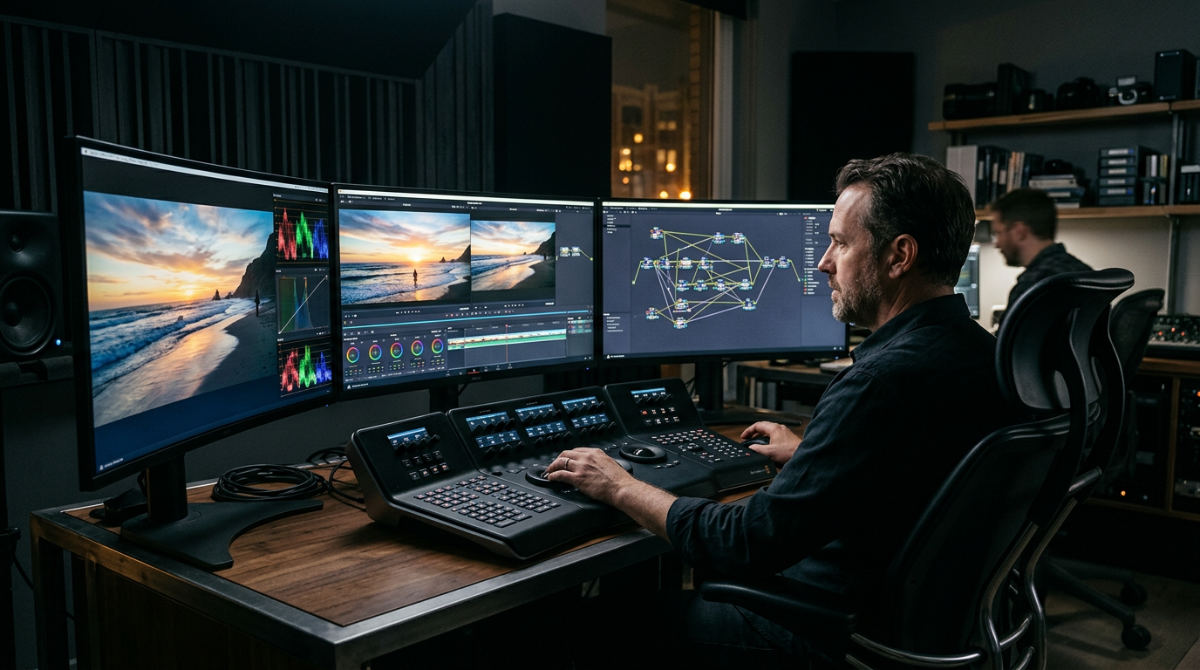
Think of DaVinci Resolve as a comprehensive post-production ecosystem. It integrates editing, color correction, VFX, and audio tools into a unified user interface. Originally developed by da Vinci Systems in 2004, the platform was later acquired by Blackmagic Design in 2009. This acquisition shifted the software from a high-priced hardware-dependent color suite into an accessible software solution for global creatives. Current architecture allows you to transition between specialized pages, Cut, Edit, Fusion, Color, and Fairlight, without the need to export files or open external applications.
Pretzel Logic treats this software as a unified environment where every page lives in total sync. This structure gives corporate marketing teams a massive edge. It kills the software hopping and endless exporting found in the Adobe Creative Cloud suite. The software runs on Windows, Mac, and Linux. It slots into any studio regardless of the IT setup. We use this integrated logic to keep the momentum going from the first assembly to the final master.
The original vision doesn’t get diluted during hand-offs. Because we stay inside one app, we skip the technical friction that usually grinds high-stakes commercials to a halt. Stability matters. It is vital when you’re juggling campaigns for local law firms, restaurants, and national brands. Jumping from a rough cut to a deep color grade with one click makes the process iterative and fast. Modern businesses streamline their data using integrated all-in-one features to manage pipelines efficiently. We do the same with your pixels.
Consolidation is the only way to meet tight deadlines. By maintaining a single project database, multiple team members can access different parts of the timeline simultaneously. This eliminates the risk of version control errors that often plague traditional multi-app workflows. High-precision internal processing ensures that image and audio quality remain high throughout every stage of the creative process.
Comparing Workflows: Resolve vs Premiere Pro
Adobe Premiere Pro is a popular editor, but its architecture leads to a different creative path. Premiere uses layers. That works for basic cuts, but it gets messy during heavy compositing. Resolve uses nodes in its Fusion and Color tabs. When looking at the DaVinci Resolve Studio price, it requires a one-time purchase of $295. Adobe charges you every single month. This cost difference makes it a sustainable choice for long-term production studios.
The Node Advantage: Nodes let you branch your workflow. You can apply different effects to the same source in parallel for total creative control.
Node-based work allows for sophisticated visuals, like dropping 3D titles into an explainer video or swapping out a dull sky, without burying the main timeline. Premiere users usually have to "round-trip" to After Effects for this. Resolve users just click a different tab. Collaboration is another separator. While Premiere uses Adobe Team Projects, Blackmagic Cloud offers a dedicated library for true, real-time multi-user work.
The money side is simple. Many agencies do their cut in Premiere, then export an XML to Resolve just to use its world-class color engine. This hybrid method keeps editors in their comfort zone for the cut while ensuring the final spot has that high-end Resolve look. However, we choose to stay entirely within Resolve. It provides a faster non-linear editor experience without the technical hurdles of file translation.
Feature Comparison for Corporate Branding
The table below breaks down the logistical gaps between the two top platforms. This helps brands decide which workflow fits their internal needs.
| Feature | DaVinci Resolve Studio | Adobe Premiere Pro |
|---|---|---|
| VFX Engine | Fusion (Node-based, Built-in) | After Effects (Layer-based, Separate) |
| Audio Toolset | Fairlight (DAW-level, 2000 tracks) | Essential Sound (Basic mixing) |
| Color Grading | Industry Standard (Nodes) | Lumetri Color (Layer/Slider) |
| Cost Model | One-time Payment | Monthly Subscription |
| AI Tools | Neural Engine (Native) | Sensei (Native) |
We use these tools to make sure our professional post-production services hit global broadcast standards. Whether we’re chasing a bright restaurant look or a sharp corporate interview style, the node toolset keeps brand colors mathematically perfect. The ability to handle complex deliverables like HDR10+ and Dolby Vision natively is a major reason why high-end commercial agencies prefer this toolset. It is the gold standard.
Harnessing the DaVinci AI Neural Engine
The DaVinci AI Neural Engine provides automated solutions for complex tasks. It handles object removal, facial recognition, and smart reframing for social media. This machine learning layer allows editors to skip repetitive manual work and focus on the artistic direction of the piece. For example, the Magic Mask tool can track a person or object through a scene. It allows for isolated color grading without the need for manual rotoscoping, which traditionally takes hours to complete.
Pretzel Logic also uses these tools for corporate video production to isolate specific products, adjusting their brightness or color without touching the rest of the frame. We can take old footage from a law firm and use AI upscaling and noise reduction to make it look new. Facial recognition helps us sort through hours of interview b-roll. It identifies speakers automatically, so we spend our time on the story rather than digging through folders.
For motion graphics and animation, the AI tracks objects in 3D space with almost no manual work. We can pin text to a wall so it looks physically attached to the room. The Neural Engine also powers Voice Isolation, a tool that removes distracting background noise from interviews while keeping the speaker’s voice natural. Technical automation ensures that even projects with fast turnarounds maintain a high production value.

Practical Logistics and Hardware Requirements
To run DaVinci Resolve effectively, hardware must be optimized for heavy GPU processing and high-speed data throughput. Resolve is one of the few applications that utilizes multiple GPUs simultaneously to accelerate rendering and playback. While a basic laptop can run the free version for light editing, professional commercial production requires a machine with high VRAM and a dedicated NVMe storage solution (like a 2TB Samsung 980 Pro) to handle the massive file sizes associated with 4K and 8K raw camera footage.
Production Logic: We match Hollywood standards by using Blackmagic hardware and Resolve for every high-stakes project we take on.
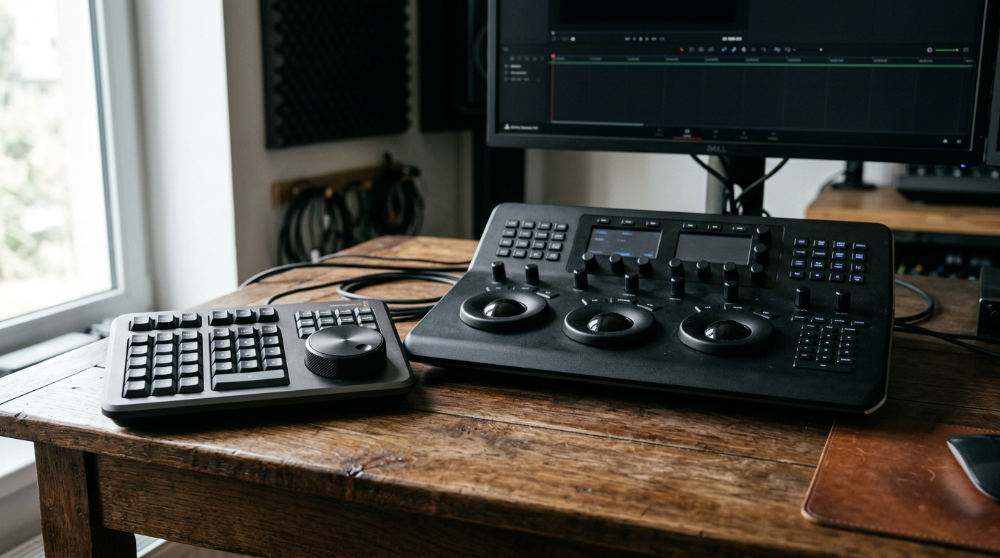
The Neural Engine requires a dedicated GPU with sufficient VRAM to maintain system stability. Adding a Speed Editor keyboard gives editors tactile control, which slashes the time spent on the first cut. Storing big 4K raw files requires fast drives or a solid NAS to stop playback from stuttering. When you’re hiring a video production company, check if their gear can actually handle the high bitrates Resolve is built to master.
Professional color grading requires a calibrated monitoring setup. We use dedicated I/O hardware like the DeckLink or UltraStudio to bypass the operating system’s color management. This ensures that the colors we see in the studio are the exact colors the client sees on their screen. Without this hardware link, there is a risk of color shifts. That ruins a brand’s visual identity across different platforms.
Prerequisites for a Professional Resolve Setup
You need a solid foundation before you start cutting commercials. Resolve is a resource hog and needs a specific environment to play nice. The software demands high-performance components because it offloads the majority of the processing to the graphics card rather than the central processor.
- Time Investment. Plan for a significant amount of practice. Mastering high-end color grading can take years of dedicated practice.
- Financial Cost. Use the free version to learn. The Studio version requires a single payment, and you get future updates for free.
- Essential Hardware. You need a dedicated graphics card (NVIDIA RTX or Apple M-series), a calibrated monitor, and fast storage. Trust your eyes.
- Current Software. Keeping the software updated ensures the best cloud and AI performance. Frequent updates ensure compatibility with the latest camera formats.
- Networking. A high-speed internet connection is required if you plan to use Blackmagic Cloud collaboration features for remote team editing.
1. Organize your project media
Throw your raw footage into the Media Pool. Use Smart Bins to sort clips by resolution, frame rate, or camera ID. Staying organized here stops technical headaches later. It lets you find the right shot in a heartbeat. Proper metadata tagging makes the search function incredibly powerful during long-form projects.
2. Assemble the rough cut
Head to the Cut page for a fast assembly or the Edit page for traditional three-point editing. This is where you set the pace. Make sure the narrative matches the brand’s tone. The Edit page provides a deep set of trimming tools and a traditional timeline layout that most professionals find intuitive.
3. Apply professional color grades
Use the Color page to balance your shots. Apply "looks" using serial and parallel nodes. Visual consistency matters. We match different cameras and lighting to create a cinematic feel. This is where the power of the history of da Vinci Systems truly shines as the industry-standard color tool.
4. Integrate visual effects in Fusion
Open the Fusion tab to add 3D titles or scrub out background distractions. Because Fusion is built-in, you see your effects update on the main timeline instantly. Node-based compositing in Fusion allows for much more complex layering than traditional track-based systems used in other editors.
5. Master the audio in Fairlight
Use Fairlight to clean up dialogue, layer in sound effects, and mix in stereo or 3D. With 2,000 tracks available, you have the power of a full recording studio inside your editor. Fairlight includes professional tools for ADR, foley recording, and advanced compression to ensure every commercial sounds professional.
6. Export for final delivery
The Deliver page has presets for YouTube, TikTok, and broadcast TV. You can queue several renders at once. Export every format for a multi-platform campaign in one go. Customize the encoder settings. This ensures the highest quality while maintaining manageable file sizes for web delivery.
Common Pitfalls in Post-Production
- Skipping proxies. If you don’t optimize your media, playback will lag. Even on a beast of a machine. Proxies allow for smooth editing on modest hardware.
- Over-grading. If you push a node too hard without fixing the base image, you’ll get digital "noise." It looks cheap. Always work from a balanced starting point.
- Ignoring audio. Don’t just stay on the Edit page for sound. Use Fairlight. A mix without depth kills the professional vibe of a corporate brand.
- Workflow clutter. Don’t build one "mega-node" in Fusion. Use a sequence of nodes. This lets you fix things when they break later.
- Ignoring Backups. Failing to set up project backups or using the Live Save feature can result in hours of lost work if a power failure occurs. Don’t risk it.
Frequently asked questions
Is DaVinci Resolve actually free?
The standard version is free. It has most of the editing, color, and VFX tools you’ll need to start. The Studio version adds the AI engine, noise reduction, and support for resolutions higher than 4K. It also unlocks high frame rate support and advanced stereoscopic 3D tools.
Can DaVinci Resolve run on a laptop?
It can, but you need a dedicated GPU and 16GB of RAM. Apple’s M-series chips are excellent because Resolve is highly optimized for that architecture. For PC laptops, ensure you have an NVIDIA or AMD graphics card rather than integrated Intel graphics.
How does Blackmagic Cloud differ from Adobe Team Projects?
Blackmagic Cloud hosts the project database on a secure server. This lets a whole team work on the exact same timeline at once, a colorist can grade a shot while an editor trims the next one. Adobe Team Projects is more focused on syncing versions between different accounts.
Does it handle vertical video for social media?
Yes. It has "Vertical Resolution" presets and an AI Smart Reframe tool. You can switch between landscape and vertical in the settings without starting a new project, making it perfect for multi-platform ad campaigns.
Can I import Premiere Pro projects into Resolve?
Yes. Export an XML or AAF from Premiere to move your timeline over. Just keep in mind that complex transitions or third-party plugins might not carry over. These may need a quick fix in Resolve after the import is complete.
If you want to push your brand’s video further, our team can help. We blend technical skill with solid storytelling. Reach out to our experts for a consultation and let’s get your next commercial project moving.