Last updated November 13, 2026
DaVinci Resolve editing software is a comprehensive post-production suite by Blackmagic Design that integrates professional video editing, color correction, visual effects, and audio mastering into one application. It is the industry standard for Hollywood-level color science, used by studios to achieve cinematic visual consistency and high-end creative finishes.
Key takeaways
- Unified Workflow. DaVinci Resolve is the only application combining editing, color, VFX, and audio in a single workflow.
- AI-Powered Tools. The DaVinci Neural Engine uses AI for advanced tasks like facial recognition and object removal.
- Color Excellence. Professional color grading in Resolve is the industry standard for high-end Hollywood and commercial finishing.
- Speed and Efficiency. Many modern production workflows utilize the specialized Cut Page to deliver rapid, high-quality social content.
What is DaVinci Resolve Editing Software?
DaVinci Resolve is the world’s only solution that combines editing, color correction, visual effects, motion graphics, and audio post-production in one tool, according to DaVinci Resolve Product. By housing these traditionally separate disciplines under one roof, the software eliminates the need to "round-trip" or export files between different programs. This architecture preserves image quality and saves massive amounts of time during the finishing phase. It operates via dedicated "pages" such as Fusion for motion graphics and Fairlight for audio. Specialists work within a unified environment without ever leaving the project file.
Practical Rule: For the fastest social media turnaround, utilize the Cut Page in Resolve; it is designed specifically for high-speed editing without the clutter of the full Edit Page.
At Pretzel Logic, we use this architecture to bridge the gap between technical logical workflows and high-level conceptual storytelling. When we handle software for post production, we look for tools that stay out of the way of the creative spark that makes a brand memorable. Post-production workflows in Resolve allow us to move from a rough cut to a final color grade within the same environment. We also hook up professional external hardware like the Speed Editor and dedicated color panels to increase tactile control. This speed is vital. It keeps our fast-paced commercial projects on track.
Why Pretzel Logic Uses DaVinci Resolve for Color Grading
Professional color science ensures visual consistency for national brands across diverse display formats. This specialized engine allows colorists to recover highlights and shadows that other editors might lose. We use this platform to ensure that whether a viewer sees a commercial on a high-end OLED television or a smartphone screen, the colors remain true to the brand’s identity. Technical reliability is non-negotiable. For high-stakes production, the finishing pipeline must be bulletproof.
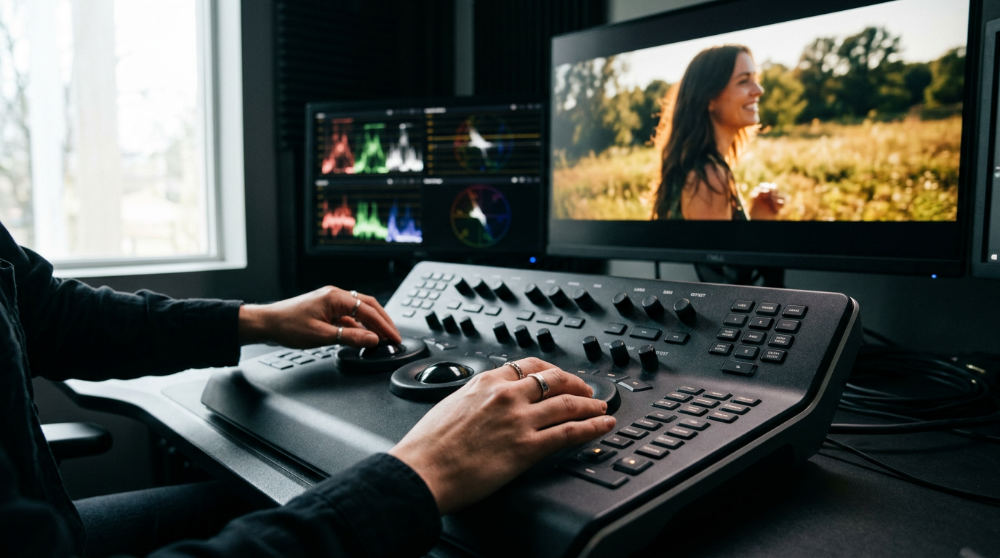
The software’s HDR Primary Color Grading tools allow us to manipulate light and shadow with surgical precision. We use these tools to create specific aesthetics favored by lifestyle brands. This is not just about making things look polished. It is about using color to evoke specific emotions and drive consumer action. For agencies looking to reach specific demographics, such as those served by InnoVision Marketing Group, having this level of visual control is essential for culturally resonant storytelling.
By utilizing "Power Windows" and secondary corrections, we highlight specific brand elements in a frame without affecting the overall natural lighting. For example, in a lifestyle piece, these tools can make the coastal golden hour pop while ensuring the product remains perfectly exposed. This level of control is why Resolve remains the industry standard for finishing more Hollywood feature films than any other NLE video editing suite. At Pretzel Logic, we bring that same cinematic rigor to every corporate project we touch. We believe the logic of the tool should serve the twist in the story.
Is DaVinci Resolve Better Than Premiere for Professional Video Production?
Adobe Premiere excels in broad creative integration, but DaVinci Resolve is our pick for high-end finishing due to its specialized color and audio tools. Premiere is a fantastic "all-rounder." Resolve is a powerhouse. It offers a more robust internal node-based system for visual effects via Fusion. Premiere often requires round-tripping to After Effects, which can break metadata or slow down the workflow. For our high-end commercial video editing, the ability to stay within one timeline while performing complex compositing or 3D tracking is a massive advantage.
In our AI video production workflows, Resolve’s internal processing handles the blending of traditional cinematography and emerging tech more fluidly. We often use the software to marry high-fidelity camera footage with AI-generated elements, ensuring the lighting and texture match perfectly. This creates a "visionary workflow" where the technology serves the story. The following table compares key technical capabilities between the two leading professional platforms.
| Feature | DaVinci Resolve Studio | Adobe Premiere Pro |
|---|---|---|
| Color Science | High-Fidelity YRGB (Industry Standard) | Standard RGB Engine |
| VFX Architecture | Internal Node-based (Fusion) | Layer-based (Requires After Effects) |
| Audio Suite | Full Fairlight DAW Integration | Essential Sound Panel |
| AI Engine | DaVinci Neural Engine (Native) | Adobe Sensei |
| Collaboration | Blackmagic Cloud (Multi-user) | Frame.io Integration |
Comparison: Resolve vs Premiere Technical Capabilities
The fundamental difference lies in the workflow structure. Resolve uses a page-based unified system. Premiere uses a workspace-based modular system. In Resolve, you click a tab at the bottom to change your entire toolset from editing to audio, ensuring all tools are purpose-built for that specific task. Premiere changes the layout of the windows but keeps the same underlying engine. Regarding the color engine, Resolve features advanced high-bit depth color science. This allows for much deeper recovery of highlights and shadows than Premiere’s standard RGB engine, providing a "hero" look for commercial work.
The DaVinci Neural Engine provides native facial and object tracking within the primary interface. This is incredibly efficient for tasks like skin smoothing, removing distracting background objects, or tracking masks without needing third-party plugins. While Premiere utilizes Adobe Sensei for automated tasks like "Auto Reframe," Resolve’s AI is deeply integrated into the grading and masking process. For collaboration, DaVinci Resolve Studio supports project libraries via Blackmagic Cloud. This allows a team to work on the same timeline as a client’s internal marketing department simultaneously.
What are the Main DaVinci Resolve Free Limitations?
The free version of DaVinci Resolve has restrictions on maximum export resolutions and frame rates. This makes it unsuitable for high-end IMAX or 8K deliveries required by certain modern broadcast standards. It is an incredibly powerful tool for starters. Professional work hits a ceiling fairly quickly. The free version lacks the DaVinci Neural Engine entirely. Users do not have access to AI-driven tools like magic mask, face refinement, or speed warping for high-quality slow motion, which are staples of professional commercial editing.
Watch Out: The App Store version of DaVinci Resolve often lags behind the standalone Blackmagic download in terms of update frequency and external hardware compatibility.
Important Resolve FX (including film grain, lens flares, and advanced noise reduction) are exclusive to the Studio version. These are the "finishing touches" that give modern commercials their polished, high-budget feel. Users should note that the app store version of DaVinci Resolve is missing certain features available in the standalone version. This includes specific plugin support and certain encoder options. If you are building a professional pipeline, the standalone Studio version is generally the requirement for hardware stability.
Is the Free Version of DaVinci Resolve Good Enough for Professional Work?
For independent creators and social media managers, the free version provides a high-quality entry point. However, it lacks the GPU acceleration required for complex commercial timelines. When you are dealing with multiple streams of high-resolution footage, the free version may struggle to maintain smooth playback because it typically only leverages a single GPU. Professional studios require the Studio version for multi-user collaboration and advanced HDR mastering tools. These are necessary for broadcast delivery. This ensures that the final output meets all technical legal requirements for television.
Professional environments utilize the Studio version to provide clients with efficient render times and AI-enhanced quality. For example, Studio-only tools like "Magic Mask" allow editors to quickly isolate specific subjects to adjust saturation or exposure. This level of control makes specific visuals more impactful in significantly less time. If your project requires advanced object removal or global cloud collaboration, the free version will not meet your production needs. High-stakes brand storytelling requires the full feature set.
Do You Work With Brands Across the Country?
Pretzel Logic Productions serves corporate brands, law firms, and agencies across the United States from our San Diego base. We utilize cloud-based Resolve workflows for efficient remote collaboration. We aren’t limited by geography. Our tech stack is built for remote efficiency and high-speed data transfer. Cloud workflows allow clients to review high-fidelity color grades and edits during the production process. A marketing director in another city can watch a stream of a coloring session and give feedback in real-time. This ensures total creative alignment.
Our approach combines a visionary post-production ecosystem with the technical reliability of professional-grade hardware and software. We understand that a video marketing strategy is only as good as its execution. By using Resolve to maintain the highest technical standards, we ensure that the unique element that sets you apart is presented with the best possible visual quality. Whether you are looking for a new commercial overhaul or a series of high-impact social videos, our team is ready to bring your vision to life.
If you are ready to move beyond basic editing and want a partner who understands the intersection of logic and creativity, we are here to help. You can contact us to discuss how we can apply these professional finishing tools to your next brand campaign. Fill out the form at https://pretzellogicproductions.com/contact-us/ to get started.
FAQ
What are the main features of DaVinci Resolve?
DaVinci Resolve includes professional tools for video editing, color correction, visual effects (Fusion), and audio post-production (Fairlight) within a single application.
Is DaVinci Resolve free to use?
Yes, there is a powerful free version available. However, the Studio version is a one-time purchase that unlocks AI tools, higher resolutions, and advanced noise reduction.
Why is DaVinci Resolve popular for color grading?
It uses a 32-bit float YRGB color engine and node-based workflow, which provides more control and higher image fidelity than traditional layer-based editors.
Can DaVinci Resolve handle 4K and 8K video?
The free version supports up to Ultra HD 4K (3840 x 2160). The Studio version supports higher resolutions and higher frame rates.
What are the system requirements for DaVinci Resolve?
It requires a powerful GPU with sufficient VRAM, a modern multi-core CPU, and a high amount of system RAM to ensure smooth performance in complex projects.